

Guides · Printing
Printing and placing your QR sign
Size, contrast, paper and position — the physical craft that decides whether the code on your wall is ever scanned.
A digital guest guide has one physical dependency, and it is the part most hosts spend the least time on. The guide can be perfect; if the sign is printed small, taped low, and facing a window, nobody reads it.
This is the craft of the sign itself: how big, how dark, on what, and where.
How big the code needs to be
The rule that matters is the ratio between scanning distance and code size. A QR code is reliably scanned from about ten times its own width — a 3 cm code works at roughly 30 cm, a 5 cm code at half a metre.
For a sign someone picks up or leans towards on a kitchen table or wall, that means a printed code of at least 3 cm square, and 4–5 cm if you have the room. Below about 2 cm you are relying on a good camera and good light, and the scan that fails is the guest who gives up and texts you instead.
Two related mistakes:
- Do not scale a code up from a small file. Enlarging a low-resolution image softens the edges of the modules and the camera loses them. Export at the size you intend to print.
- Keep the quiet zone. The blank margin around a code is functional, not decorative — scanners use it to find the code’s edges. Cropping tight to the pattern, or letting a border or photograph run into it, is a common reason a code that looks fine does not scan.
Contrast, and the colours that quietly fail
A scanner is reading dark modules against a light background. Everything follows from that.
Dark on light works. Light on dark — a white code on a black card — fails on many phone cameras, because most decoders expect the conventional polarity. It looks excellent in a photograph and disappoints in a hallway.
Low-contrast pairings fail too, however tasteful: mid-grey on beige, navy on charcoal, anything tonal. If you want the sign to match the room, change the accent colour and leave the code itself dark on a pale ground.
Print quality matters here in a way screens hide. A code that renders crisply on your monitor can bleed at the module edges on a cheap inkjet on absorbent paper. If you print at home, print one and scan it before you print twelve.
Paper, and what survives a season
A guest guide sign lives in a working property. It gets wiped, splashed, knocked and cleaned around, sometimes weekly by someone who is in a hurry.
- Plain paper is fine for testing and poor for use. It curls, marks and yellows.
- Card, 250 gsm or heavier, standing in a simple holder, is the best effort-to-durability trade for most kitchens and hallways.
- Laminated card survives kitchens and bathrooms properly. Use matte lamination, not gloss — gloss reflects, and a reflection across the code is the single most common in-property scan failure.
- A framed print behind non-reflective glass suits an entrance hall and looks like it belongs.
Whatever you choose, matte beats gloss every time for anything a phone camera has to read.
What QRiousStay exports
The QR Print Designer produces the sign for you rather than leaving you to assemble one. It offers six layouts — Classic, Warm, Midnight, Bold, Tabletop and Window — and exports A5 at 300 DPI, as PDF or PNG, in your accent colour. Basic and Premium add your property logo.
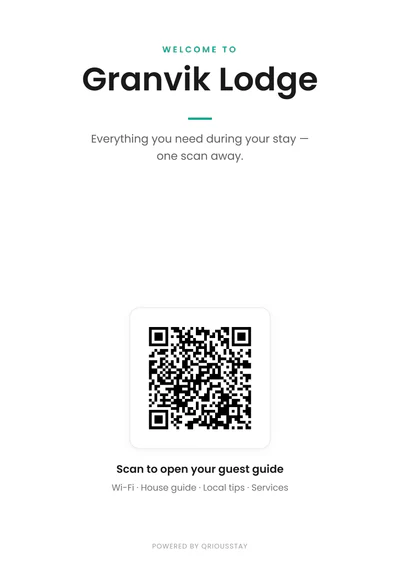
A5 at 300 DPI is the useful part of that sentence. It is a real print resolution, not a screen graphic enlarged, so the code holds its edges from a commercial printer or a decent home one. Send the PDF if you are printing externally — it is the format print shops want, and it will not be resampled on the way.
The layouts differ in more than looks. Classic is a centred poster for a wall. Tabletop puts two modules on one sheet for a table stand. Window is framed for glass. Pick for the surface it is going on.
Where to put it
The guiding principle: a sign belongs where the question is asked, not where it is convenient to hang.
By the door, inside. The arrival sign. This is the one that earns its place — check-in details, Wi-Fi, the two things that are not obvious. A guest standing in the hall with bags is exactly the moment.
In the kitchen. Appliances, bins, recycling. The kitchen is where the second wave of questions happens, usually an hour after arrival.
On the table or counter. A tabletop stand is scanned more often than a wall sign, because it is at reading height and in the way in the right sense.
Near the entrance, outside, if you have self-check-in. Weatherproof it properly and think about whether a code visible from the street is something you want.
Placements that disappoint:
- Above eye level. A guest has to hold a phone up and steady; most will not.
- Facing a window or a lamp. Glare across the code. Walk into the room at the time of day guests arrive and look at the sign from where they will stand.
- Inside a drawer or a folder. If it has to be found, it will not be.
- On the fridge, among everything else. A code competing with magnets, takeaway menus and a child’s drawing reads as another flyer.
- In the bathroom only. Humidity, and the wrong moment.
One sign in the right place beats four scattered. If you use more than one, keep them consistent — the same layout and the same colour, so the second one is recognisably the same thing as the first rather than a different system.
The instruction line
A code with no words beside it gets fewer scans than a code with three. Not everyone knows what your code leads to, and some guests assume any QR in a rental is a payment request or a review prompt.
Say what it is and what it costs: “Scan for Wi-Fi, check-out and local recommendations. No app needed.” The last part matters more than hosts expect. Guests have been trained by restaurants and car parks to expect a download.
QRiousStay guides open in the phone’s browser with no app, no account and no login, so that line is true and worth saying.
Test it before you trust it
Four tests, all of which take a minute:
- Scan it from where a guest stands. Not from 15 cm away at your desk.
- Scan it on a second phone. Camera quality varies more than you would like, and an older Android is the honest test.
- Scan it in the evening, under the lamp that is actually on when guests arrive.
- Check where it lands. The guide should open on the section that suits the sign’s position — an arrival sign that opens on a general index makes the guest do the work twice.
Why the printed code does not need reprinting
The reason it is worth doing the physical work properly once is that you should only have to do it once.
In QRiousStay the code points at the accommodation itself rather than at a snapshot of its contents. Editing the guide, changing the Wi-Fi password, adding a service or switching theme all change what the next scan shows without touching the sign. You can rename the readable web address whenever you like and the printed code is unaffected.
That is not true of every QR code, and the distinction is worth understanding before you print anything at all: QR codes that survive the season.
Once the sign is up, the guide behind it is the rest of the job — how to set up a digital guest guide covers that end to end, and what to include covers what goes inside it.